

FOSSBilling generates invoice PDFs with Dompdf, which renders HTML and CSS into a printable document.
Logos and Remote Assets
Section titled “Logos and Remote Assets”Dompdf cannot fetch remote assets directly. Custom PDF templates must use local or embedded images, styles, and fonts. Use the supplied logo_source variable for the company logo and css for the invoice stylesheet instead of adding remote URLs.
FOSSBilling fetches remote company logos separately, blocking private networks and checking image types, contents, and dimensions. Downloads are limited to 2 MiB, and SVG logos must be self-contained. Unavailable or rejected remote logos are omitted from the PDF.
If a logo is missing, check that it is publicly reachable, uses a supported image format (PNG, JPEG, GIF, BMP, WebP, or self-contained SVG), and meets the size limits. Internal-only logo services cannot be used as remote sources. Generate a test PDF after changing the logo or custom assets.
CSS Limitations
Section titled “CSS Limitations”Dompdf is not a complete PDF engine. FOSSBilling uses Dompdf 3.x, which supports many print-friendly CSS features but still has layout limitations:
| Supported | Not Supported |
|---|---|
| CSS 2.1 and some CSS3 | Flexbox |
@import, @media, @page | CSS Grid |
CSS custom properties and math functions such as calc() | Browser-style complex layouts |
| Basic positioning and table layouts | Splitting table rows or cells across pages |
Custom CSS
Section titled “Custom CSS”Creating a Custom Stylesheet
Section titled “Creating a Custom Stylesheet”- Copy
/modules/Invoice/templates/pdf/default-invoice.css - Paste as
/modules/Invoice/templates/pdf/custom-invoice.css
FOSSBilling automatically uses custom-invoice.css if it exists.
CSS Classes Reference
Section titled “CSS Classes Reference”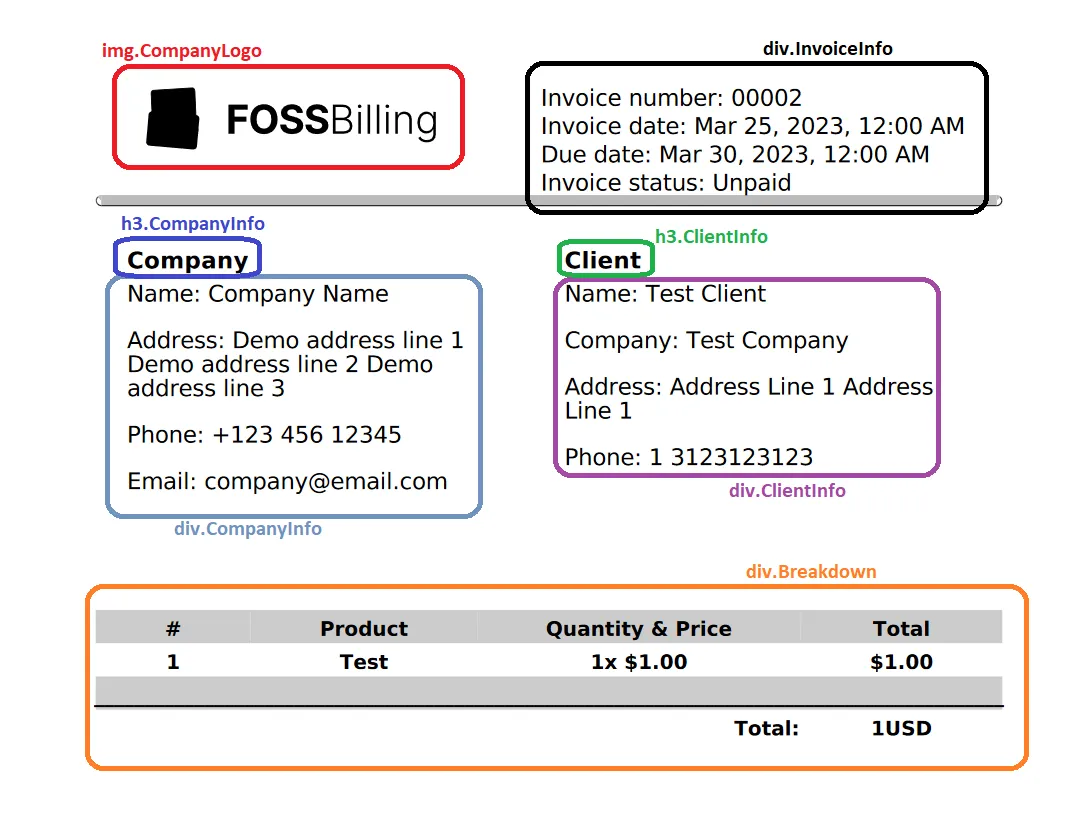
The default stylesheet uses these classes:
.CompanyLogo— Company logo image.TopSectionDivider— Divider below the header area.InvoiceInfo— Invoice number, dates, and status.CompanyInfo— Seller/company heading and details.ClientInfo— Client heading and details.Breakdown— Line items, tax, discount, and total table.InvoiceText— Custom invoice text blocks.InvoiceFooter— Payment details, company footer, and signature.muted-text— Muted footer signature text
Custom HTML Template
Section titled “Custom HTML Template”Customize the HTML structure by adding a custom Twig template.
Creating a Custom Template
Section titled “Creating a Custom Template”- Copy
/modules/Invoice/templates/pdf/default-invoice.twig - Paste as
/modules/Invoice/templates/pdf/custom-invoice.twig
FOSSBilling uses custom-invoice.twig automatically.
Template Variables
Section titled “Template Variables”Available in PDF templates:
| Variable | Description |
|---|---|
currency_code | Invoice currency code for format_currency. |
css | Contents of custom-invoice.css or default-invoice.css, inserted into the template's <style> block. |
logo_source | Resolved company logo source: a local path, an image data URI (including validated remote logos), or an empty string. Dompdf does not fetch remote URLs. |
seller | Display-ready seller/company lines keyed by labels such as Name, Address 1, Phone, and VAT Number. |
seller_lines | Number of seller lines used by the default template for layout calculations. |
footer | Company footer details, including company name, bank details, address fields, email, phone, VAT/company number, website, and signature. |
buyer | Display-ready buyer/client lines keyed by labels such as Company, Name, Address, City, Country, Phone, and VAT Number. |
buyer_lines | Number of buyer lines used by the default template for layout calculations. |
invoice | Full invoice API array. Line items are in invoice.lines; raw buyer, seller, and client data are in invoice.buyer, invoice.seller, and invoice.client. |
The PDF renderer does not provide top-level client, company, or currency variables. Use invoice.client, seller/footer, and currency_code instead.
Example: Add a Custom Header
Section titled “Example: Add a Custom Header”<div class="custom-header"> {% if logo_source %\} <img src="{{ logo_source }}" alt="{{ seller['Name']|default(seller['Company']|default('Company logo'|trans)) }}"> {% endif %\} <h1>{{ 'Invoice'|trans }} #{{ invoice.serie_nr }}</h1></div>Remove backslashes in actual template code.
Twig Filters
Section titled “Twig Filters”PDF templates support the same Twig filters available elsewhere in FOSSBilling:
{{ invoice.total|format_currency(currency_code) }} {# Format as currency #}{{ invoice.created_at|format_date }} {# Format the invoice date #}{{ invoice.text_1|default('')|markdown_to_html }} {# Render invoice text as HTML #}Testing Changes
Section titled “Testing Changes”- Make your edits to
custom-invoice.cssorcustom-invoice.twig - Generate a test invoice
- Download the PDF
- Review the output
Debugging
Section titled “Debugging”For complex issues, enable FOSSBilling debug mode in config.php:
'debug_and_monitoring' => [ 'debug' => true,],Then review your PHP or FOSSBilling logs for Dompdf-related messages.